

You are an hour into real work, a sophisticated multi-step task that is finally coming together, when Claude stops. A yellow banner: you have hit your usage limit. If it is the five-hour session cap, you wait a few hours or pay to keep going. If it is the weekly cap, it is worse: you can be locked out until the new week begins, days away, with the task frozen where it stalled.
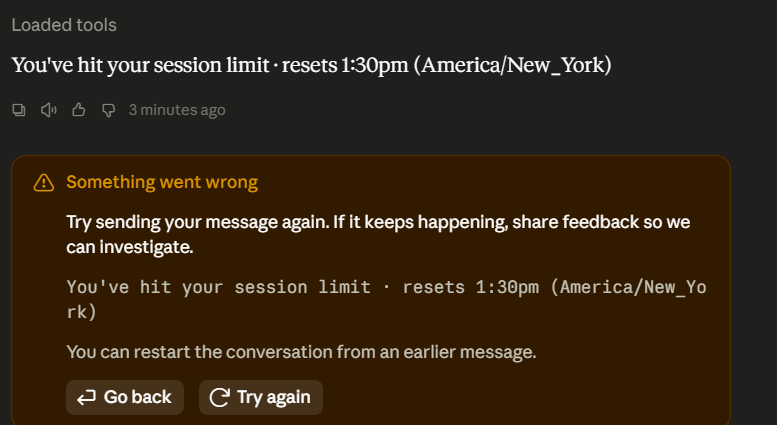
Figure 1. The wall, mid-task. A yellow error ends the session and shows the reset time. The five-hour session cap clears the same day; the weekly cap can hold you off for days.
It feels like the tool quit on you at random, right when the work got serious. It didn't. You spent your usage faster than the task required, and once you see how Claude bills you, you can make that wall rare. No code required; most fixes take seconds.
It is no accident that token consumption is suddenly on everyone's mind. In one week this July, xAI, OpenAI, and Meta each shipped a model and led with the same claim, more efficient, fewer tokens, lower cost [1][2][3]. The industry has started competing on how little compute an answer takes. But you don't need a new model to spend fewer tokens. How you use the one you already have is the bigger lever.
Why You Hit the Wall: The Meter Is Compute, Not Messages
Your plan does not ration a fixed number of messages. It meters compute, and two meters run at once: a five-hour rolling window that starts on your first prompt, and, on paid plans, a separate weekly cap that resets on a fixed day [4]. A long, file-heavy session on the biggest model can drain a window many times faster than a string of short questions, which is exactly why the wall tends to arrive in the middle of demanding work rather than at a tidy stopping point.
By default, hitting the limit is a hard stop with no surprise charge, until the window resets [4]. That protects you from a runaway bill. So the goal isn't to unlock more; it's to spend what you have more slowly, which means knowing what the meter counts.
What Drives the Meter: Tokens, and the Pricey Half
Claude does not read words. It reads tokens, the small chunks of text a model takes in and produces [4]. A short word is usually one token; a longer one splits into several. Every exchange has two token costs, and they are not priced the same: the text you send in, and the text Claude writes back out. Output is the expensive side. On Sonnet 5 it runs five times the input rate [4].
That ratio holds across the lineup, and the numbers explain why one habit can cost ten times another:
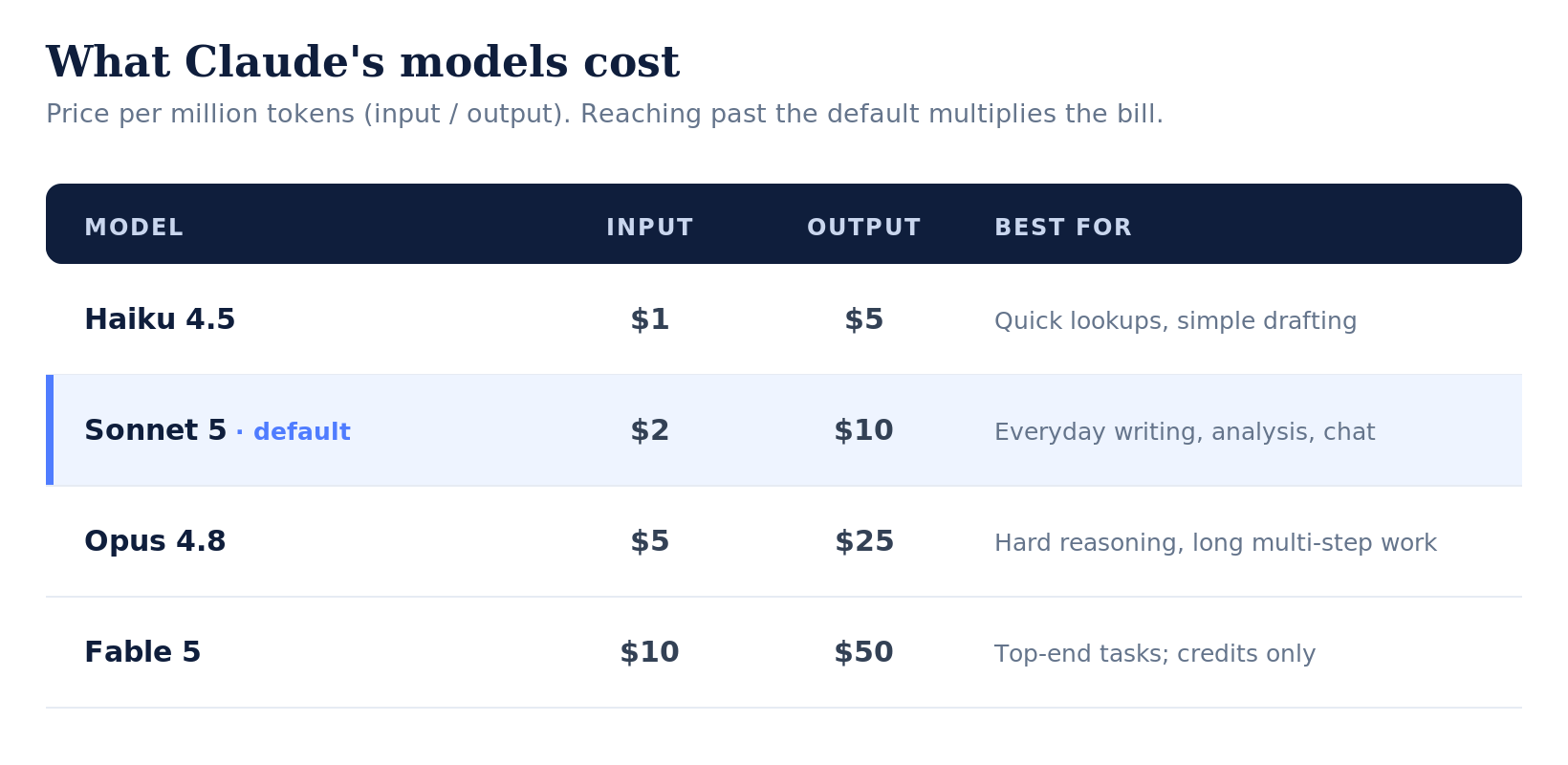
Figure 2. What Claude's models cost, per million tokens. Reaching for a heavier model than the task needs is the most common waste.
Price per million tokens (input / output). Sonnet 5 shows introductory pricing through Aug 31, 2026; it returns to $3 / $15 on Sep 1. Fable 5 moved to metered usage credits on paid subscriptions after July 7 [4]. For comparison, this month’s Grok 4.5 lists at $2 / $6 and GPT-5.6 Sol at $5 / $30 [1][2].
Two things jump out. Reaching for a heavier model than the task needs is the most common waste: the same email drafted on Fable 5 costs ten times what it costs on Haiku. And because output is the pricier half, a rambling five-paragraph reply you never asked for is not just slower to read, it is the expensive side of the trade.
The Hidden Driver: You Re-Send the Whole Chat Every Turn
Here is the mechanism most people miss A conversation is not parked on Claude's side and consulted cheaply. Every time you press enter, the entire thread so far is sent back in for the model to re-read, along with its own earlier reasoning on recent models [4]. Turn two re-reads turn one. Turn twenty re-reads all nineteen turns before it.
Picture a chat where each message and reply runs about 300 words. By the twentieth turn, one short new question drags roughly 12,000 words of history through the model before it writes a single word of the answer. The question felt small; the bill was not. And the longer a thread runs, the closer it also creeps to the conversation's length ceiling, where the model's focus starts to drift [4].
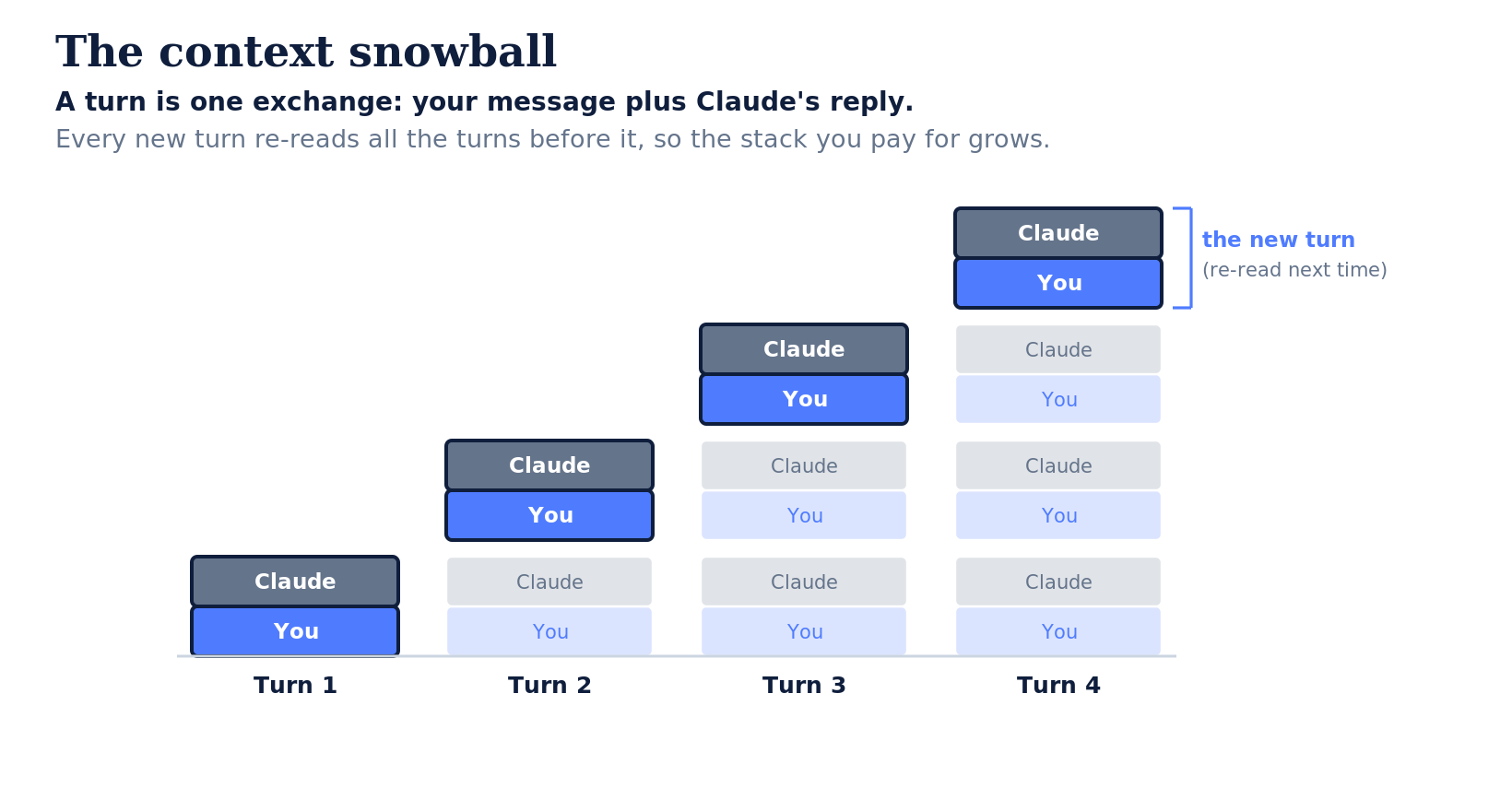
Figure 3. The context snowball. A turn is one exchange — your message plus Claude's reply. Each new turn re-reads every earlier turn before Claude answers, so the pile you pay for grows with the conversation.
And It Matters What You Upload: Why PDFs Burn Tokens
It is not only how long a thread runs, but what you put in it, and the format matters more than most people realize. When you attach a PDF, Claude turns every page into an image and extracts its text alongside it, so a single page can cost 1,500 to 3,000 tokens [4]. Attach a twenty-page report and you can spend up to 70,000 tokens the moment you upload it, then re-read all of it on every later turn in that chat.
The same content as Markdown or plain text can cost 70% to 90 % less [5]. Screenshots and raw HTML are heavy for the same reason — images carry vision tokens, and markup tags are tokens too. Converting a file to clean text before you upload it is often the single biggest input saving, because that bloated attachment is also what every later turn re-reads.
The Moves, by the Three Things You Pay For
Most tip lists are a flat pile of habits that blur together. It's clearer to sort them by the three costs above — what you spend per turn, what you re-send as context, and how you manage the meter. Twelve moves, each pulling one lever.
Lever 1 · Spend less per turn
Right-size the model. Leave everyday work on the default, Sonnet 5, which runs close to Opus 4.8 on most tasks at a fifth of the cost. Drop to Haiku for quick, simple asks; reach for Opus or Fable only when a task genuinely stalls the default. Picking the cheapest model that clears your quality bar is the single biggest saving here.
Right-size the response. Ask for the shape up front — "three bullets, no preamble" or "one paragraph" — since output is the pricier half. And switch extended or adaptive thinking off for simple questions: it spends extra tokens reasoning through every reply and keeps that reasoning in the thread to be re-read. Save it for problems that need the depth.
Plan in chat, then build. Use ordinary chat to work out exactly what you want before you ask Claude to generate the expensive artifact, the spreadsheet, the long document, the deck. Nailing the spec in a few cheap sentences beats regenerating a 2,000-token output three times. Think cheap, build expensive.
Let Claude ask, then click. Instead of typing a 500-word prompt, say "ask me what you need to know first," then answer with clicks. Clicking costs almost nothing; a long typed prompt is input you pay for on every later turn, and a wrong guess is an expensive regeneration.
Lever 2 · Send less context
Convert files before uploading. Turn PDFs, screenshots, and HTML into Markdown or plain text first. As shown above, that alone can cut a file's tokens by 70 to 90 percent — often the single biggest input saving.
Paste the excerpt, not the document. When two paragraphs matter, the other forty pages are wasted input that also rides along on every later turn. Bring the passage, not the binder.
One topic per chat. Start a fresh chat when you change subjects, so you stop re-sending an unrelated thread on every turn.
Edit, don't re-send. When a prompt comes out wrong, edit the original message and regenerate rather than stacking a "no, I meant…" correction. The edited version replaces the old turn instead of adding another one the model must re-read.
Keep reusable material in a Project. Load a style guide, bio, or recurring brief once instead of pasting it into each new conversation.
Summarize and start a new chat. When a chat gets long, don't let it sprawl. Ask Claude to capture the decisions, constraints, and draft so far, then start a new chat seeded with that summary; the handoff carries the substance forward and leaves the the heavy, expensive snowball of past conversational history behind. In Claude Code and long agent sessions the same idea has a command: run
/compactat 40% to 70% capacity rather than waiting for Claude's automatic compaction near 95%, by which point quality has usually slipped [4].
Lever 3 · Manage the meter
Batch related asks, and pace the heavy work. Put three related questions in one message rather than three, and spread demanding sessions across the rolling window instead of burning it in one morning.
Watch your usage page, and decide about credits on purpose. Settings then Usage shows both meters and when they reset, so you can pace instead of hitting a wall. Turn on usage credits deliberately, knowing the meter is now running, rather than flipping it by reflex.
Design Notes: Some surfaces do warn you, but late: Cowork flags you around 90% of a session, and Claude Code auto-compacts near 95%, by which point you are already at the wall's edge. Elsewhere the meter is passive, with the progress bars and time remaining tucked into Settings then Usage [4], so you see them only if you go looking. Picture an opt-in setting that flips this around, letting you pick an early threshold, say 40%, where the number surfaces right in the chat and a last-second alarm becomes a gentle heads-up. Organizations already get a version of this legibility: admins on Team and Enterprise plans have usage dashboards across their people, while the individual user, mid-task, gets far less: a late nudge near the wall, or a usage page they have to remember to open. It is a modest echo of the trust-by-design thread I traced in The Claude Fable 5 Verification Gap: on its own, seeing your limit coming is a small convenience, not a deciding factor, but it is the kind of quiet transparency that makes a tool easier to live with.
Efficiency Is Responsible Compute
None of this requires counting tokens to the character. It rewards the discipline good communication has always asked for: say what you mean, bring only what the task needs, and start clean when the subject changes. The meter is grading that discipline every time you press enter.
The labs spent this month racing to make their models more efficient. But the quiet truth is that the biggest efficiency gain available to you isn’t in a new software update; it’s in how you engage with the tool. By optimizing your prompts, you aren’t just saving your token budget; you are participating in responsible acceleration, reducing unnecessary compute power while doing your best work.
References
TechCrunch. "SpaceXAI releases Grok 4.5, which Elon describes as an 'Opus-class model.'" July 8, 2026. techcrunch.com
TechCrunch. "OpenAI launches its new family of models with GPT-5.6." July 9, 2026. techcrunch.com
Meta AI. "Introducing Muse Spark 1.1." July 9, 2026. ai.meta.com
Anthropic. Claude documentation and Help Center, 2026: Token counting, Pricing, Context windows, Compaction, and PDF support (Platform Docs); How usage and length limits work and Manage usage credits (Help Center); Introducing Claude Sonnet 5; Redeploying Claude Fable 5.
MindStudio. "How to Convert Files to Markdown to Reduce AI Token Usage by Up to 90%." 2026. mindstudio.ai